Mobile and Tablet Devices Review

Cyber Living posts the specifications or details of the latest mobile phones and tablets with some thought comments on the device You can find them by clicking the MOBILE?TSBLET DEV on the menu bar above. Or you can click this link Mobile and Tablet Devices

Computer Problems Solutions

For personal computer/notebook problems and tips, refer to PC PROB from the menu or click this link Personal Computer Problem Solutions.

What's in the world with Philippine ISPs

Discussions about Philippine Internet Service Providers (ISPs) particularly problems users are encountering but are not getting any solutions.

  • Tips or work around to these problems to improve browsing experience.
  • Do you have any problems too? Give your comments below each of the posts to be heard.
  • Or better yet, send me a message on our contact form if you want a dedicated article to your problem on this site.
  • Bloggers and Webmasters tips/tricks

    Looking for something to implement to your site? Our Bloggers' tips/tricks have what you need. If you do not find it there, notify us through our contact form.

    SEO Tips

    Tips to improve your rankings on Search Engine Resuts Pages (SERPs).

    Showing posts with label Mobile and Tablet Devices. Show all posts
    Showing posts with label Mobile and Tablet Devices. Show all posts

    Wednesday, August 14, 2013

    Coby Kyros MID7047 Android 4.0 Tablet


    Coby Kyros 7047-4
    Coby Kyros 7047-4 overview | source: http://www.cobyusa.com
    Coby 7.0" MID7047 Android Tablet


    Here is an unexpensive Android tablet running on Ice Cream Sandwich designed for budget customers. This is made for those looking for a low budget tablet that has the basic capabilities like web browsing, music playback and playing some basic games.

    Here are some positive notes about this Tablet

    • 7.0" Multi-touchscreen - easily zoom with two fingers as well as other capabilities of a 2-point multi-touch device.

    • Wi-Fi Support - connect to the internet wirelessly through its 802.11 b/g/n comm port.

    • Wide range of media support - play most of the internets sound, video and photo formats.

    User experience:
    No one is talking about this tablet yet. Be the first to comment.

    • Pros
      1. Affordable
      2. With microSD expansion capability
    • Cons


      1. Narrow viewing angle
      2. Not a real Android Tablet as it does not even have access to Google Play.
      3. Lags at times

    Here is the complete list of its specifications:

    Operating System Android 4.0 Ice Cream Sandwich
    Processor / ChipsetCortex™-A5 (Telechips)
    1.0 GHz
    Graphic
    Display7.0” TFT LCD (WVGA 800 x 480),  capacitive Multi-touchscreen, 16:9 aspect ratio
    TouchscreenYes
    LCD Features


    MemoryFlash; 512MB
    Hard DriveBuilt-in 4GB/Expandable up to 32GB
    HDD Interface
    ColorBlack
    MultimediaBuilt-in Microphone
    Integrated Speaker


    CommunicationWi-Fi IEEE 802.11 b/g/n
    ---
    PortsUSB 2.0 High Speed (Micro Connector)
    3.5mm Headphone
    MicroSDHC


    InputTouchscreen
    PowerAC 100-240VAC INPUT, DC 5V output
    ---
    Dimension7.75 x 0.45 x 4.5
    Weight7 lbs.
    Software
    *Software can be changed without notice


    OthersPlays/displays common internet audio/video/Photo formats.
    Available in the following languages:English, Spanish, French (Canada & France), German, Chinese (Simplified and Traditional), Italian, Portuguese (Portugal and Brazil), Korean, Japanese, Russian, Hebrew, Greek, Arabic
    CE, FCC certified
    ---
    ---
    Warranty---
    ---
    Samsung Support Pagehttp://www.samsung.com/us/support/owners/product/XE700T1C-A01US
    (includes manual downloads and FAQs & How Tos)


    Back to CyberLiving home page

    Other Posts

    Tuesday, July 30, 2013

    Nokia Asha 501 Review/Spec

    Nokia Asha 501 front
    Nokia Asha 501 Dual Sim |
    image source: http://www.nokia.com.ph

    Nokia Asha 501 (Dual SIM)

    Here is an inexpensive Nokia phone that would be new phone owner want to buy. At first glance this phone may look like a Lumia only smaller.

    Apparently the Asha 501 tries to go against the current norm and went smaller instead of bigger. The Asha 501 is small at 99.2x58mm (h x w) compared to what we are normally sold in the market these days. There was a time back in the early days of cellular phones where smaller is better, this phone is trying to prove that. Of course the only disadvantage is that with a smaller body, you will also get a smaller display which is not so good when you are browsing or playing games or videos.

    Here are some positive notes about this phone
    Nokia Asha 501 swap SIM
    Easily swap SIM withou loosing each SIM's settings |
    image source: http://www.nokia.com.ph

    • Low data usage full browsing experience - It also tries to minimize data usage while browsing with its Nokia Express Browser. It uses less data while still richly displaying content.
    • Get Social all-in-one screen - With a single swipe, it brings out your social media interface in a single screen. Updating status and receiving them are all in a single screen.
    • Swapping SIM has never been easier - Now it is possible to swap SIM cards and never have to worry about the settings in each SIM. It remembers settings of up to 5 SIMs.


    User experience:

    Here are some comments from people who have already used the device.


    • Pros:


      1. Good battery life
      2. phone is good for its price
      3. gives smartphone experience for a phone that is not
    • Cons

      1. small browsing screen
      2. no support for apps like nimbuzz and whatsapp.


    PricePhp3,000 - Php4,500
    NameNokia Asha 501
    Release DateJune 2013 (Announced May 2013)
    Operating SystemNokia Asha software platform 1.0
    Dimensions99.2 x 58 x 12.1 mm (3.91 x 2.28 x 0.48 in)
    Weight98.2 g (3.46 oz)
    Network TypeGSM 900 / 1800 - RM-899; 850 / 1900 - RM-900; GSM 900 / 1800 - SIM 1 & SIM 2 - RM-902
    SIMOptional Dual SIM (Micro-SIM, dual stand-by)
    Display TypeTFT capacitive touchscreen, 256K colors
    Display Size240 x 320 pixels, 3.0 inches (~133 ppi pixel density)
    Multitouch Display?Yes, Up to 2 fingers
    Vibration AlertYes
    MP3 Alert/RingtonesYes
    LoudspeakerYes
    Speaker JackYes, 3.5mm jack
    Internal Memory128 MB, 64 MB RAM
    Memory ExpansionYes, microSD, up to 32 GB, 4 GB card included
    GPRSYes, Up to 85.6 kbps
    EdgeYes, Up to 236.8 kbps
    WLANYes, Wi-Fi 802.11 b/g
    BluetoothYes, v3.0 with EDR
    USBYes, microUSB v2.0
    Primary Camera3.15 MP, 2048x1536 pixels
    Secondary Camera-
    Video CaptureYes,QVGA@15fps
    AccelerometerYes
    Proximity SensorYes
    Other Sensors-
    MessagingSMS(threaded view), MMS, Email, IM
    BrowserWAP 2.0/xHTML, HTML
    RadioYes, FM only
    GPSNo
    JavaYes, MIDP 2.1
    ColorBright Red, Bright Green, Cyan, Yellow, White and Black
    BatteryLi-Ion 1200 mAh battery (BL-4U)
    Battery | Stand-byUp to 1152 h (dual SIM: Up to 624 h)
    Battery | Talk Time Up to 17 h (dual SIM: Up to 17 h)
    Battery | Music Play TimeUp to 56 h
    Battery | Browsing Time-
    SAR US1.41 W/kg (head)
    SAR EU0.96 W/kg (head)
    Support Pagehttp://www.nokia.com/ph-en/support/


    Back to CyberLiving home page

    Other Posts
    Back to home page

    Samsung Galaxy Tab™ 2 7.0 Review/Specs


    Samsung Galaxy Tab 2 7.0 front view
    Samsung Galaxy TM Tab2 7.0 front view |
    source: http://samsung.com

    Samsung Galaxy Tab™ 2 7.0 (Wi-Fi) 8GB


    Last April 22, 2012, Samsung has released another tablet from their 7-inch series. The Samsung Galaxy TabTM 2 7.0 seems a rehash of the earlier released Galaxy Tab 7.0 Plus.

    To be honest, because many loved the Galaxy Tab 7.0 Plus but had reservations in buying due to its price, they have this released.

    Looking from a distance the it looked like the Tab 7.0 Plus. Only at closer inspection will you see the difference in thickness (Galaxy Tab2 7.0 is slightly thicker). There are also several other downgrades here and there like its front camera which is VGA resolution from an HD quality in 7.0 Plus. CPU speed is now 1Ghz from 1.2Ghz in 7.0 Plus.

    Still, many of the selling point of the Galaxy Tab 7.0 Plus is carried to it like its bright TFT LCD display, microSD slot and rear camera. 

    Here are some positive notes about this Tablet

    • Loaded with lots of apps and can carry lots of content - Although not necessarily a plus, it comes pre-loaded with apps from social media to weather updates, access to Google Play Store, entertainment and many more. Of course a user can always remove apps he/she deems not necessary. And with an external microSD port (up to 32G) of files and media storage couple that with a cloud storage of 50G (good for 2 years free), an owner could carry virtually everything he/she needs.
    Samsung Galaxy Tab2 7.0 endless apps and content
    Endless apps and content at your fingertips | source: http://samsung.com

    • Easily customized - With Touchwiz, things is easily customized and organized giving easy access to contents.
    Samsung Galaxy Tab2 7.0 TouchWiz
    Add a touch of TouchWiz and contents are accessed easily | source: http://samsung.com
    • A home entertainment Tab - Stream shows from TV screens using SmartView. If you lost your TV remote, this Tab can do it for you.

    • Extendable Memory - With the built in microSD slot, memory can be extended and give up to 32G more memory of storage for files like photo, documents, video and music.
    Samsung Galaxy Tab2 7.0 microSD slot
    Load up more data with up to 32G more memory | source: http://samsung.com

    User experience:
    Here are some comments from people who have already used the device. Most feedback are positive.

    • Pros
    1. Bright display.
    2. Built-in speakers.
    3. Leight weight.
    4. Inexpensive.
    5. Realistic color.
    6. Solid feel
    7. With flash player

    • Cons

    1. Can't install apps on the microSD.
    2. Most apps from Google Play are supported but there are still some that it does not support.

    Here is the complete list of its specifications:

    PricePhp11,000 - Php12,800 (as of July 31, 2013)
    Operating SystemAndroid 4.1, Jelly Bean
    Processor / ChipsetTI OMAP4430
    -
    Graphic'none'
    Display7"; 1024x600Pixel (resolution)
    TouchscreenYes
    LCD Features-
    -
    -
    Memory8GB (internal); micro SD card slot supports up to 32GB (external)
    Hard Drive-
    HDD Interface-
    ColorTitanium Silver
    Multimedia3.0 Megapixel (rear)
    Music: MP3, AAC/AAC+/EAAC+, WMA, OGG (vorbis), FLAC, AC-3 ; Sound: AVideo Codec: Mpeg4, H.264, H.263, VC-1, Divx, VP8, WMV7/8, Sorenson Spark; 
    Format: 3gp(mp4), wmv(asf), avi(divx), mkv, flv, webm
    Format: 3gp(mp4), wmv(asf), avi(divx), mkv, flv, webm
    CommunicationWi-Fi Only
    Bluetooth
    Ports802.11n wireless network support
    Proprietary USB and power connection
    -
    -
    -
    -
    Input-
    Power4,000mAh (Battery)
    -
    Dimension4.8" x 7.6" x .41" (W x H x D)
    Weight0.76 lbs
    Software
    *Software can be changed without notice
    -
    -
    -
    -
    -
    -
    -
    -
    -
    -
    Others-
    -
    -
    -
    -
    Warranty1 year limited warranty period for parts
    1 year limited warranty for labor
    Samsung Support Pagehttp://www.samsung.com/us/support/owners/product/GT-P3113TSYXAR
    (includes manual downloads and FAQs & How Tos)


    Back to CyberLiving home page

    Other Posts
    Back to home page

    Sunday, July 28, 2013

    Samsung XE700T1C Review/Specs


    Samsung XE700T1C overview
    Samsung XE700T1C overview | source: http://www.samsung.com
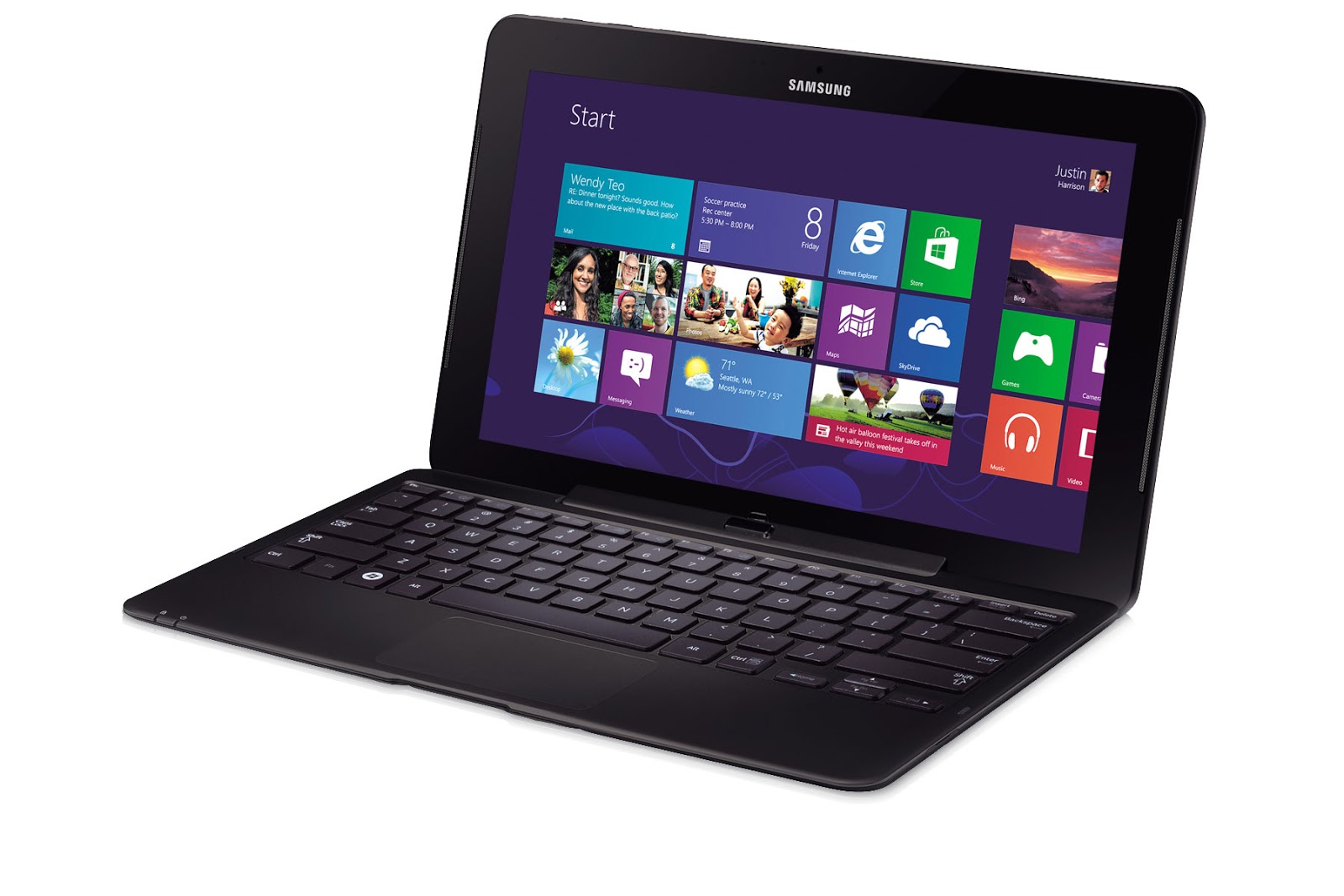
    Samsung ATIV SmartPC Pro XE700T1C-A01US


    The XE700T1C is one of Samsung's latest in tablet PCs. Although they were not the first to have thought it, it has revolutionized user's computing experience by combining the power of a notebook (or in the case a desktop) and the convinience of a tablet.

    It is comparable to a notebook because it comes with a full-sized keyboard out of the box which you can mount if needed. It is like a desktop PC because it uses an Intel® Core™ i5 Processor 3317U (1.70GHz, 3MB L3 Cache) to drive it. Now that is what I call a tablet with a punch.

    Here are some positive notes about this Tablet

    • Intel® Core™ i5 processor - This tablet is fast and it owes it to its processor.

    • Tablet convertible to Notebook - for more productivity, this tablet comes with a keyboard that you can dock to it for faster typing.


    Samsung XE700T1C front
    Front of the tablet. It uses Windows 8 for its OS | source: http://www.samsung.com
    When docked onto its keyboard:

    Samsung XE700T1C docked on keyboard
    Docked onto its keyboard, it becomes a notebook for productivity | source: http://www.samsung.com


    • Sketching/Drawing/Creating an art is much easier and faster - With the S-pen and its 1024 level pressure sensitivity, graphic designers will surely love its accuracy.

    • It has multi-touch capability - With its 10-points multi-touch capability, it provides more control by allowing you to use all ten fingers at the same time as opposed to the traditional 2-points multi-touch that we have been accustomed to.


    Here is an overview of its ports:
    Samsung XE700T1C ports overview
    Ports overview of the device | source: http://www.samsung.com
    User experience:
    Here are some comments from people who have already used the device.

    • Pros

      1. Indeed this tablet is very fast.
      2. The keyboard, although a bit cramped, is good for typing and is very easy to get accustomed to.
      3. Very slick and stylish design.
      4. It has a solid feel, given that it has a plastic casing.
      5. Very good for doing artwork.
      6. Bright display
    • Cons
      1. Docking into the keyboard is not very easy.
      2. Keyboard gets disconnected easily due to improper docking.
      3. No battery on the keyboard. It gets power from the tablet instead of it providing for the tablet. Many users asked this improvement.
      4. The S pen is a hit or miss to people as opposed to what Samsung's sales pitch to be very good. Others like it while others say it is too small on their hands. One artist mentioned it to be too smooth that there is not much felt while drawing/writing thus it is very easy to go over.
      5. Battery capacity to device power consumption limits a user to at most 5 hours based on their actual experience.
      6. Touchpad on keyboard is not so accurate.


    Here is the complete list of its specifications:

    Operating SystemGenuine Windows 8 (64-bit)
    Processor / ChipsetIntel® Core™ i5 Processor 3317U (1.70GHz speed, 3MB L3 Cache)
    Intel HM76
    GraphicIntel® HD Graphics 4000
    Display11.6" FHD LED Display (1,920 x 1,080 resolution)
    TouchscreenYes
    LCD FeaturesGloss, 16:9, 400 nits SuperBright Plus Technology
    Touch Screen with Digitizer S Pen
    LED Full HD Screen
    Memory4GB DDR3 System Memory at 1600MHz (on BD 4GB)
    Hard Drive128GB Solid state Drive
    HDD InterfaceSATA2
    ColorBlack
    MultimediaStereo Speakers ( 1 watts x 2 )
    SoundAlive™
    Internal Dual Array Digital Mic
    2.0 megapixel Webcam (front), 5.0 megapixel Webcam with Flash (rear)
    CommunicationIntel® Centrino® Advanced-N 6235, 2 x 2 802.11abg/n (up to 300Mbps), Widi Support
    Bluetooth V4.0
    Ports1 Micro HDMI
    1 USB3.0
    MicroSD Multi-media Card Reader
    1 Headphone out/Mic-in Combo
    1 Dock Port™
    1 DC-in
    InputTouch screen
    Power4Cell (49Wh)
    40 watts AC Adapter
    Dimension304.0 x 189.4 x 11.9mm (11.97" x 7.46" x 0.47")
    Weight0.888kg (1.96lbs) [Wifi Model]
    Software
    *Software can be changed without notice
    S Note
    S Player
    S Gallery
    S Camera
    PowerDVD
    Settings
    SW Update
    Recovery
    Norton Internet Security (60 days Trial)
    Norton Online Backup (30 days Trial)
    OthersAmbient Light Sensor
    Accelarometer Sensor
    Compass Sensor
    Gyro Sensor
    Prominity
    Warranty1 year limited warranty period for parts
    1 year limited warranty for labor
    Samsung Support Pagehttp://www.samsung.com/us/support/owners/product/XE700T1C-A01US
    (includes manual downloads and FAQs & How Tos)


    Back to CyberLiving home page

    Other Posts
    Back to home page

    Friday, March 1, 2013

    Movetab MA900 review


    I recently acquired a Movetab MA900 tablet from a well known department store in my area for Php7,500. I was looking for a cheap tablet that is still good enough at least for blogging.
    What got my attention about this device is that it comes with a keyboard that is embedded on its cover. For me, that is definitely a plus as I do a lot of writing.

    Right off the box it comes with a power supply, a USB cord, a USB adapter and the ones I mentioned above, a cover (housing) with embedded keyboard which you connect to the tablet through the mini USB port. It also comes with an Android OS (Ice Cream Sandwich). Oddly enough, it has a head/earphone port but no earphone was included.

    The rest of the specs are as follows: 8GB Storage, Wi-Fi capable, Cortex A9 1.2GHz processor, Capacitive Touch Screen, Full HD Playback, HDMI port, micro USB port, 1Gb DDR3 RAM, 0.3 mpfront and 2mp rear camera, 9.1" TN LCD 1024x768pixels display, USB 3G dongle capable (selected models only), 5V, 2A power adopter, size: 242mmx189mmx9mm

    The response of the touch screen was good. Screen output is also good. I mean, for its price the screen output is already very good. It is not iPad equivalent but . . . . oh you get the idea. I forgot to mention that the screen is plastic and so there is a potential that it could get scratch rather easy. A screen protector is thus necessary which is not included.

    Some of the pre-installed apps are skype, angry birds, Aldiko, Pinterest, Adobe PDF Reader, Instagram, AVG Antivirus, picture viewer and video players.

    User experience is somewhat a hit or miss. Video/audio playback is good. I watched a 1.5 hour movie and it played with no problem. The same with music.

    USB connectivity however seems to be limited only to PC. From the manual, it says that it is compatible with the two big telecommunications company here in the Philippines. But checking the list of compatible USB modem from the settings menu does not show the recent dongle that this two companies currently use. Connecting other devices through the USB also don't work. Example is the memory card readers. Although it comes with a micro SD card slot, most camera to date uses an SD card which unfortunately can't be read through this device since it can't recognize any other device attached to its port other than a PC. Even that, the file browser does not list my PC so a user is confined to using the PC to copy and paste files to and from Movetab MA900 and the PC.

    Solution to this is connecting your Movetabe MA900 via wi-fi and browse any shared folders on the network using ES file manager.

    Camera
    The movetab MA900 has two camera. One in front and one at the back. The front camera has a missly 1.7 megapixel while the back is slightly higher at 2 megapixel and both have quiet very small sensors. As expected the output isn't something you can brag about. At a bright sunny day, any bright objects like white shirt will "glow" and make your subject look like an angel. Obviously it does not have a proper metering. What I have been doing is pointing at the sky until it gets dark then go back at my subject and quickly take the shot before it readjusts.

    There is however the panorama mode where you can pan for an angle of 180 degrees and you get a very wide image.

    Internet browsing
    Browsing is quiet nice. It slows down quiet a bit as you browse so you may want to clear the cache a few times if you want faster browsing experience. There is an option to request the desktop site (or full site), which I always do since I always connect to a wi-fi anyways, but its default is to get the mobile site. When the browser is closed it defaults back to getting the mobile site even if you have opted the full site from your last browsing.

    Going to youtube always give you the mobile site even if you checked the Request desktop site check box on the browser. And sometimes some video will not load with the mobile site using the MA900. The trick here is go down to the Youtube page and click on the Desktop Site link. This reloads the page in full, now you can watch your videos!

    Pictures
    I have opened some of my very large pictures on my movetab MA900 and although it loads when each file is opened either via file manager or MyPhoto or Gallery, it will not load properly when you use the slide show of MyPhoto or Gallery. What will only show is a small portion of the image. It means slide show will not try to fit your image on the screen. If you need to display several of your pictures using slide show on movetab MA900, you first need to resize them on another computer before copying them to the movetab MA900.

    Keyboard
    The on screen keyboard is very responsive. Like what was mentioned earlier on this page, the touchscreen response is very good.

    But I guess what we are all interested to know is whether the extension keyboard is any good. Surprisingly, it is! The resistance is very good and the overall feel is excellent. The only thing   that is putting it down is it is somewhat small. My first time using it, I have some difficulty fitting all my fingers in place (I type with all ten fingers including thumbs for space bar). The good thing is that after an hour of using the keyboard, I already got used to it. Note to the manufacturer: There is still an inch each side that can be used to make the keys bigger or wider apart.

    I guess it is worth noting that I wrote this review using the MA900.

    The extension keyboard connects to the movetab MA900 to the mini USB port using a USB OTG adaptor from a thin and flexible USB cable that is permanently connected to the keyboard. It would have been better if it can be connected directly to the mini USB port without using a USB OTG adaptor.

    Cover
    The case or cover resembles that of a leather planner that opens up to show the clipped movetab MA900 on one side and the embedded keyboard at the other side.

    As mentioned above, the the keyboard's USB cable is permanently attached to the keyboard, or in this case the case/cover. Because of this, I am a bit concerned as to how long it will last since it is left dangling when I am carrying it.

    Also, a stand is provided at the back of the tablet side of the cover to prop it as you type giving you the same experience as when you are in a notebook at a table. The only problem is the workmanship or the material is very poor. After only three days of using it, I can already see a tear and after a week, the thing that's supposed to prevent the stand from slipping is completely detached rendering it useless. I can still use the stand, but now I can't pull back too much or risk it slipping.

    Lastly, with the cover on, you can not use the back camera because there is no opening on the cover for the camera but the front camera is still very much usable. To use the back camera, you'll need to remove the movetab MA900 from its cover.

    Screen/Monitor
    Again, the screen is good. Not iPad quality but for its price, I can't complain. Me and my son uses it to watch movies through our shared network (movie is on my desktop's shared folder) but there is an angle where the image looks better especially when the scene is dark. You'll need to move the screen sideways to see it. Aside from that, everythings is great.

    Sound
    The sound is also great (for me at least). By that I mean, It does not produce sound loud enough to be heard audibly to the next room even at maximum but within the room, playing from music to movies is very audible. If you need it louder, use an external speaker to amplify the sound.

    Battery life
    Back at the store, while I was trying to decide whether to buy it or not, the dealer can't assure me longer than 45 minutes of active browsing or movie playback. But by my experience movetab MA900 can last up to 3 hours continuous browsing although charging also takes sometime. Also, I am not sure how long the battery lasts before it becomes useless and whether it is replaceable or even worth replacing.

    Mounting Devices
    I have tried to connect SD cards (using a universal card reader), USB modem (not on the list but with memory) and external hard disks and a desktop but unsucessfully able to browse its contents on this tablet. Movetab MA900 detects these external storage and the "Mount this device" on the settings becomes active but it just will not mount. I tried mount manager but to be honest that app seems not intended for device mounting.

    Apps/Downloads/PlayStore
    Downloading has no problem, everything will depend on your connection speed/quality, size of file to download and whether you have enough storage space on your memory specially with 8G, just several download and you will already be having storage space issues.

    Although the movetab MA900 is not an official Android device, accessing the Playstore is no problem as long as you have a Google account. But though the MA900 had the Playstore app preinstalled, it is advised to use the browser to access the PlayStore. Why? Because there are certain apps that will not work with this device, specially resource hug apps, and the PlayStore app will not test for compatibility however the web version does. This way, you can avoid downloading apps that are not compatible with MA900.

    Verdict:
    When most of what you do with a tablet is browse the internet, read ebooks, check your facebook and twitter status, play music and videos and writing articles for your blog and you're on a budget, then look no further this tablet is excellent for you. With a keyboard cover, the movetab MA900 will give you the same text output as a notebook can. Just use a simple notepad that is available free at PlayStore. And as long as you are not looking every bit of pixel while watching a video or looking at a photo, you won't know the difference between the display of the MA900 and a higer end tablet.

    But even if you can afford a more expensive tablet but are mostly doing the same as listed above this is highly recommended and save that money on other gadget or an add-on.

    But if you are into gaming and uses apps that requires lots of system resources, this device is not for you. Better save that money until you have enough to buy a Samsung or iPad that costs twice (or even more) than Movetab's MA900.

    Back to home page

    Other Posts
    Blank screen on reboot with no warning beeps (Computer will not boot not even a POST)
    Smart Bro always disconnecting